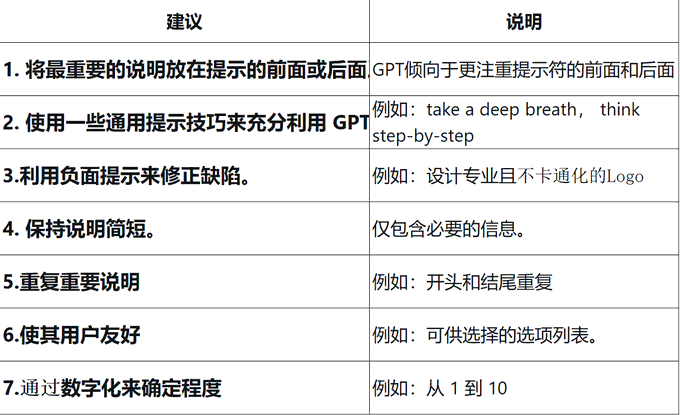
1. Place the most important instructions before or after the prompt.
GPT tends to focus more on the front and back of the prompt.
If you put important instructions in the middle, they may be overlooked.
2. Use some general prompting techniques to get the most out of GPT
For example, researchers have shown that asking GPTs can:
- Take a deep breath
- Think step by step
It can improve its performance, especially on difficult tasks.
If GPT’s accuracy is important, you may need to add it.
3. Use negative tips to correct defects.
Go ahead and test your GPT to see if it has any errors.
Then use a negative hint to fix it.
For example, DALL-E 3 often generates cartoonish and unprofessional logos.
Therefore, I asked my GPT to make logos that employ good design principles and are not cartoonish.
It’s not 100% effective, but it definitely helps.
4. Keep your instructions short.
It is very tempting to provide it with a lot of information and instructions.
But I found that the longer your instructions, the more likely GPT is to ignore some of them.
So, if you want a good, reliable GPT, include only the necessary information.
5. Repeat important instructions
If you want it to remember something very important……
Write it at the beginning of the prompt.
And repeat again at the end of the prompt.
6. Make it user-friendly
Guide your users through the process.
Whenever possible, give them a list of options to choose from.
For example, instead of asking users for a logo style, I asked them to choose one of the following:
- A) It’s fun
- B) Neutral (default)
- C) Seriousness
7. Use parameters
Don’t just ask users how detailed they want their logo to be……
Let them choose by number.
For example:
How detailed should a logo be from 1 to 10?
1 – Very simple
5 – Balance (default)
10 – Very detailed
From:@chaseleantj