Workflows greatly simplifies the construction of multi-step applications
Cloudflare has launched a new development tool: Workflows. The persistent execution engine of, is currently in public testing. This tool allows developers to use Cloudflare Workers to create stable, scalable multi-step applications. Workflows simplifies the construction of multi-step applications with features such as automatic retry, state persistence, and expansion.
What is Cloudflare Workflows?
Cloudflare Workflows is a tool that helps developers create multi-step (multi-process) applications with the following characteristics:
Can withstand errors and network problems: If you encounter errors, network interruptions, or server crashes during execution, Workflows can automatically retry and continue to complete the remaining tasks rather than starting from scratch.
State persistence: When a step is completed, Workflows saves the current state. If the next step fails, the program does not start over, but continues from the last successful step.
No infrastructure management required: Developers don’t need to configure their own servers or storage databases, Cloudflare handles all these resources in the background, ensuring that applications can run in different locations around the world.
How does Workflows work?
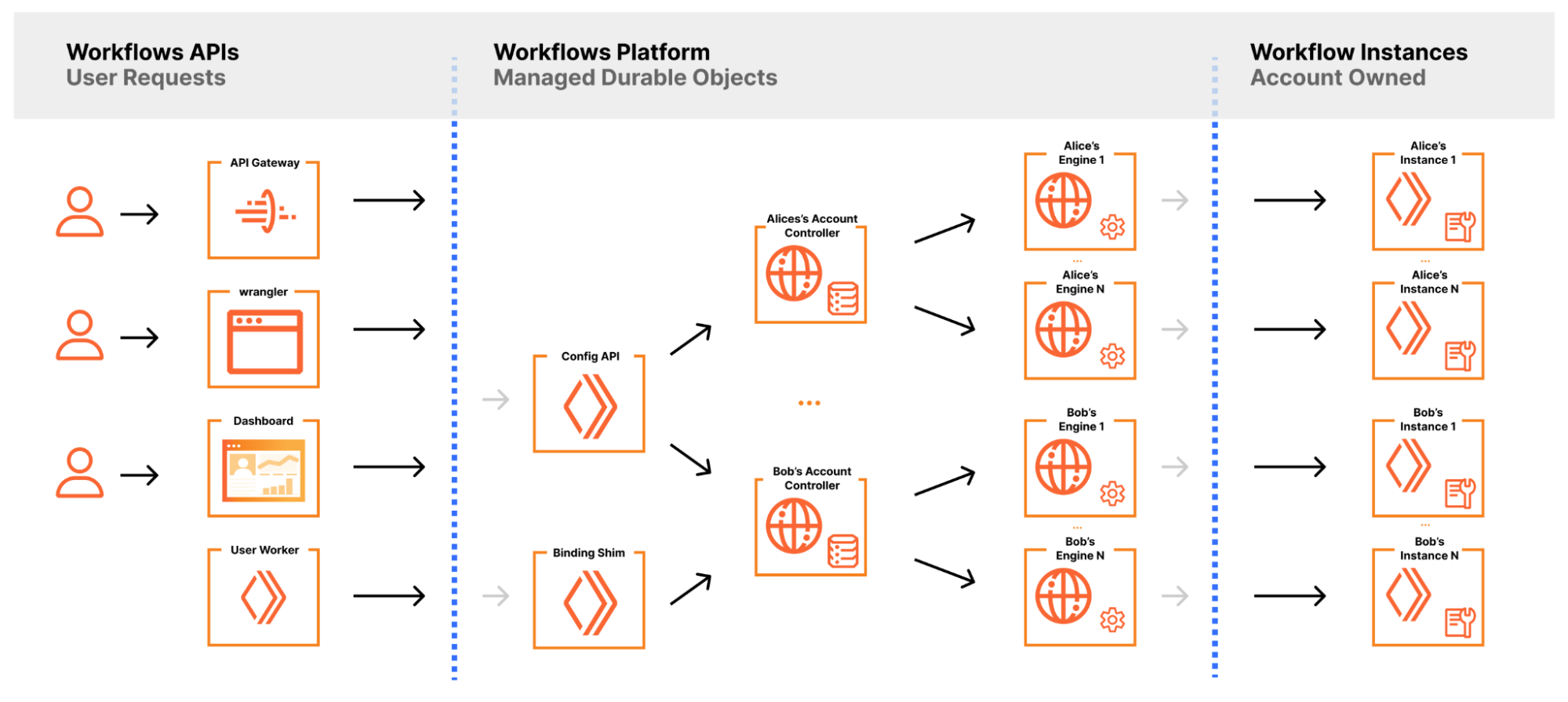
Multi-step process: Each Workflow consists of multiple steps, such as reading data, calling APIs, storing results, etc. Each step can be run independently, and if it fails, it will automatically retry several times and increase the delay time after each failure.
Automatic expansion: Workflows can increase or decrease resources as needed, such as automatically expanding capacity during peak usage periods and reducing resources during low usage periods to control costs.
State persistence: The state of all steps is saved in a storage system similar to a database, ensuring that program execution can resume even if it fails halfway.
What can Cloudflare Workflows do?
Cloudflare Workflows is a new tool specifically designed to help developers create and manage complex multi-step applications on Cloudflare’s servers. Its core functions include the following aspects:
- Create lasting multi-step workflows
Workflows allows developers to break down applications into multiple steps, such as data processing, API calls, database operations, etc.
Each step can be executed independently, with state persistence and automatic retry capabilities, which means that even if a step fails, the workflow will not start from scratch, but will continue from the last successful step.
- Error handling and retry mechanisms
Workflows automatically manages retry policies. For example, if an external API is not available or the network is interrupted, Workflows will automatically retry according to set policies such as increasing the retry delay.
With these mechanisms, developers do not need to manually write complex error-handling code, and Workflows ensures that the process can recover in the event of a failure.
- Manage and persist application state
Workflows records the status as each step is completed and saves the current progress even if a server crash or network problem is encountered.
This means that developers can create long-running applications, such as multi-day or multi-month processes, such as waiting for user input or triggering external events.
- Automatically expand and optimize resources
Workflows automatically expands or contracts resources based on the load of your app. For example, during peak traffic, the system automatically increases computing resources; during low usage, the system reduces resources, thereby reducing costs.
- Streamline the choreography of complex tasks
Developers can use Workflows to automate complex business processes such as order processing, payment confirmation, user authentication, email sending, and more.
Whether they are tasks triggered in real time or long-running background jobs, Workflows completes these tasks in a consistent and reliable manner.
- Serverless architecture and low maintenance costs
Workflows runs entirely on Cloudflare’s Serverless architecture, and developers do not need to manage underlying servers or storage devices.
This not only reduces the complexity of infrastructure maintenance, but also allows applications to be quickly deployed and run in Cloudflare data centers around the world.
for example
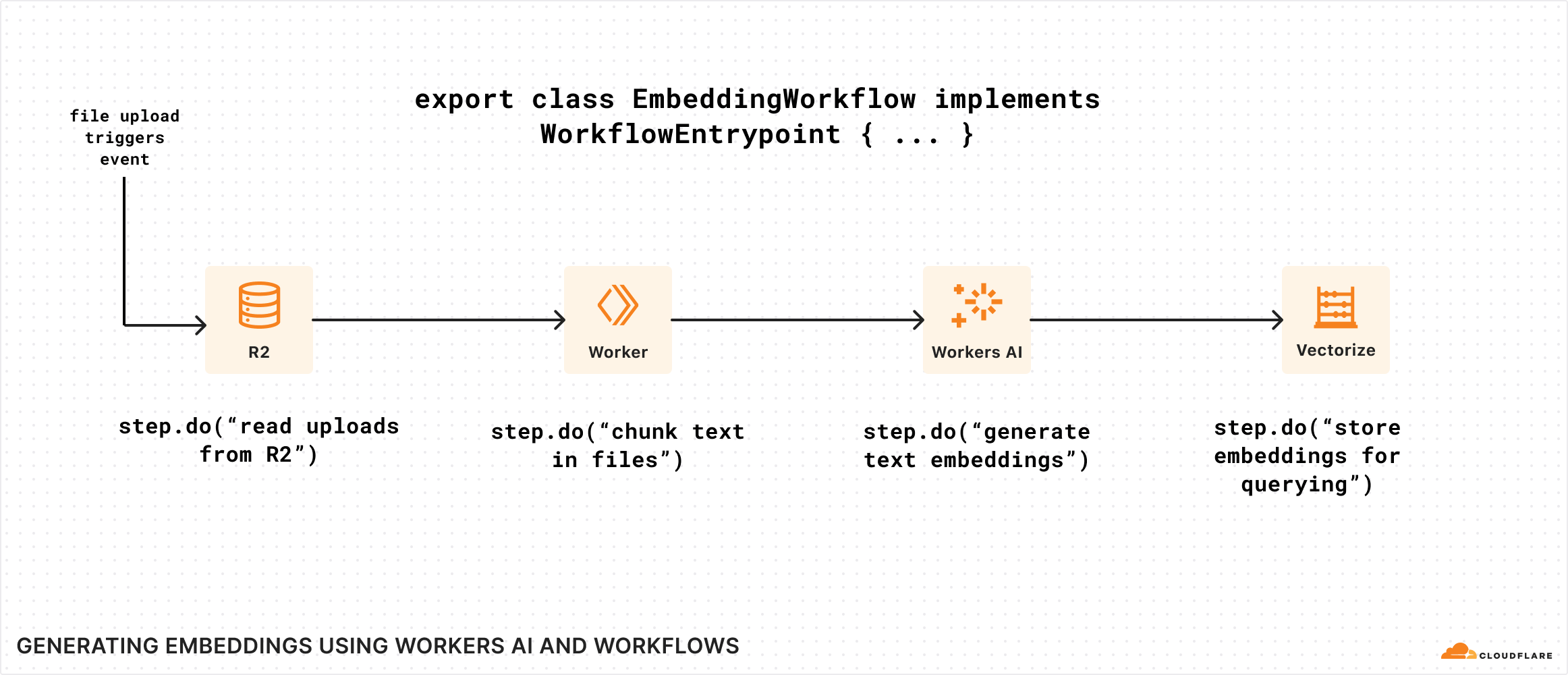
Suppose you want to create an application to process files uploaded by users, the steps might be as follows:
Upload files: Users upload files to Cloudflare R2 storage.
Processing files: The application reads the file content and extracts text.
Call external API: Send the extracted data to an external API for verification.
Save Results: Save the results in the database.
If the API is not available in step 3, Workflows will automatically retry several times. If all retries fail, Workflows retains the previous progress to ensure that it can continue from the failure point next time.
Why is it useful?
More stable: Workflows can continue to run in a variety of fault situations, such as network outages, API unavailability, etc.
Save time and energy: Developers don’t need to write complex code to handle various error situations, Workflows does this automatically.
Easy to use: Developers only need to pay attention to business logic, and Cloudflare is responsible for back-end server and storage management.
Thank you for watching this video. If you like it, please subscribe and like it. thank
Original text:https://blog.cloudflare.com/building-workflows-durable-execution-on-workers/
Oil tubing: