ROG Gunslinger 2S5CS8750 review: The notebook market from 2017 to 2018 can be said to have earth-shattering changes, especially the gaming laptop market, many new technologies that everyone has never heard of before are being updated with each passing day, for example, the screen refresh rate has increased from 60Hz to 144Hz, the material has been upgraded from TN screen to IPS screen with better viewing angle, and the color gamut has changed from 45% NTSC to the current common 72% NTSC. Even gaming laptops already have mechanical keyboards to choose from, which can be described as a hundred flowers blooming and a hundred schools of thought contending.
Today, after various manufacturers have done all of the above to satisfy consumers as much as possible, they seem to be pointing the finger at the same goal: that is, to make gaming laptops thinner and easier to carry without sacrificing gaming performance as much as possible. This used to seem like a false proposition, because the limitations of physical conditions and the strength of the function meant a thicker fuselage. However, for now, this situation seems to have changed, and ROG’s Gunslinger 2 notebook is enough to challenge the future pattern of the gaming laptop market.
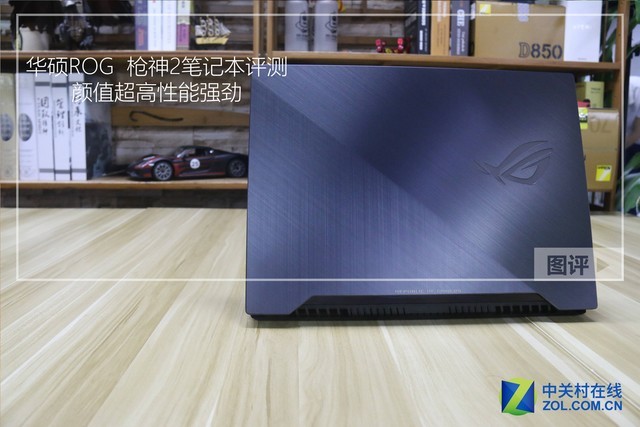
ROG Gunslinger 2
First of all, let’s look at the exterior design. The A side of the ROG Gunslinger 2 notebook uses metal as the main frame, at first glance it can be seen that the product quality is high, the surface adopts metal brushing process, and there is a diagonal line from the upper left corner of the fuselage to the lower right corner in the middle to divide the metal brushing, so that the direction of the wire drawing becomes vertical on the left side, tilted on the right side, and there is a ROG RGB light body across the surface of the fuselage, and below is the English logo of REPUBLIC OF GAMERS. After the fuselage is closed, a part of the C side and 4 status lights will be exposed, and the design language can be described as quite novel.
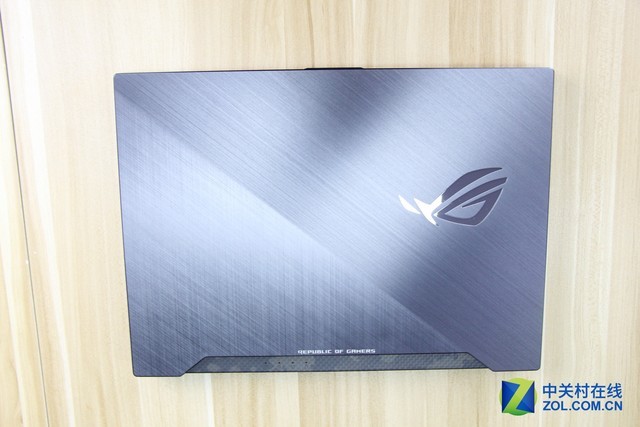
ROG Gunslinger 2 front
Unfolding the fuselage, we can see that the ROG Gunslinger 2 notebook adopts a very popular three-sided narrow bezel design, with a measured left and right bezel thickness of 7.74mm, and an upper bezel thickness of 7.70mm (there may be errors in manual measurement), the ROG logo under the bezel, and a camera on the right.
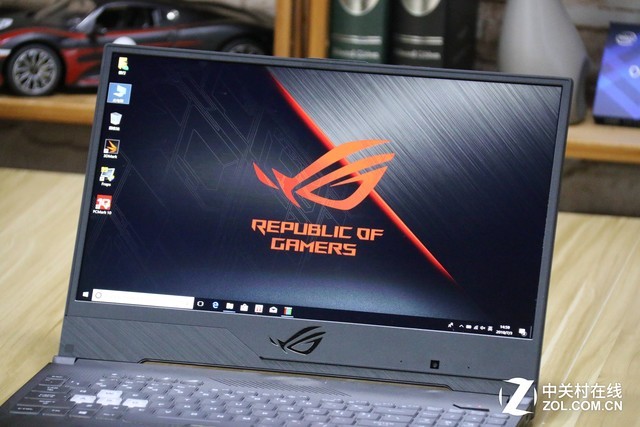
ROG Gunslinger 2 three-sided narrow bezel design
The surface OF the C side OF the ROG Gunslinger 2 notebook is treated with carbon-like fiber, with the same diagonal line in the middle as the A side, camouflage paint on the right side, and the dark black REPUBLIC OF GAMERS logo in the lower right corner. In the upper right corner is the diamond-shaped power icon, and on the left there are four function buttons, corresponding to volume up and down, microphone off and ROG GAMING CENTER. , the latter is mainly used to manage overclocking, check system status, etc.
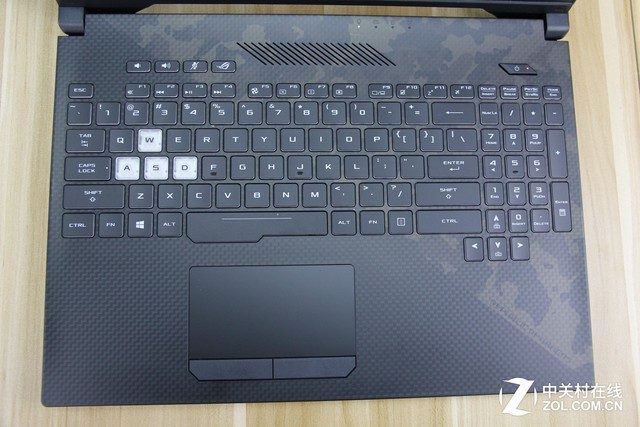
ROG Gunslinger 2 Notebook C-side
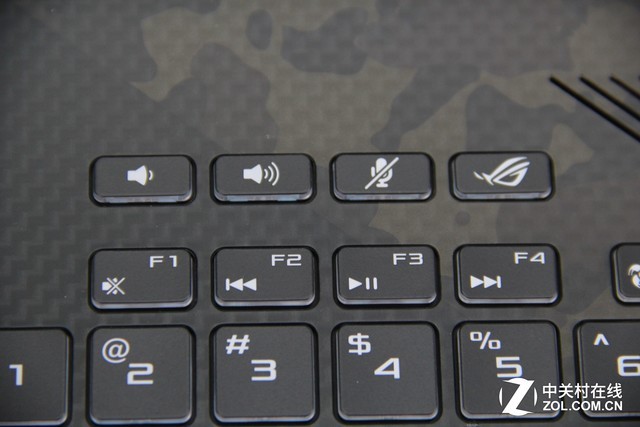
Four independent buttons
The interfaces of the ROG Gunslinger 2 notebook are basically concentrated on the left side of the fuselage, in order of power interface, network cable interface, Mini DP interface, HDMI interface, 2× USB3.1 interface, TypeC interface and 1 3.5mm headphone port, the right side of the fuselage in addition to the heat dissipation port only 1 anti-theft lock, 1 USB3.1 and an SD card slot, it can be said that I didn’t expect to be able to stuff so many external interfaces into such a thin body.
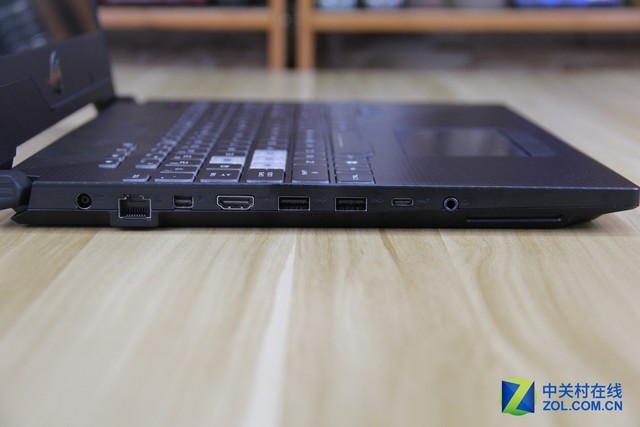
fuselage left side
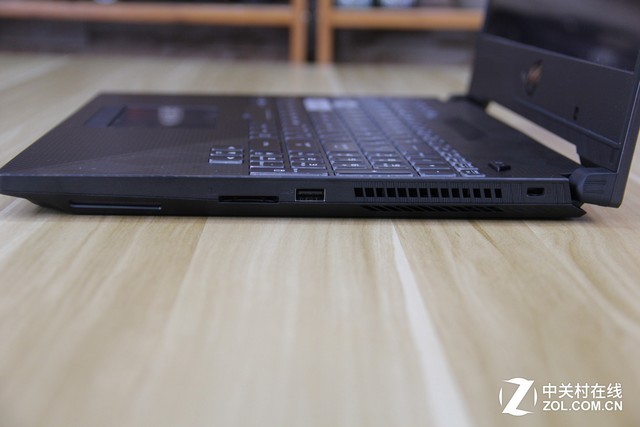
On the right side of the fuselage
Interestingly, there is also an RGB light strip on the front side of the fuselage, which can change with the color of the keyboard area, brilliant, and the D side of the fuselage also continues the overall design language, in addition to a ROG logo, there is still a slash, but this time in order to take care of the heat dissipation, the slash is slightly lowered, and there are two speakers on the left and right sides of the fuselage, and the external effect should be good.
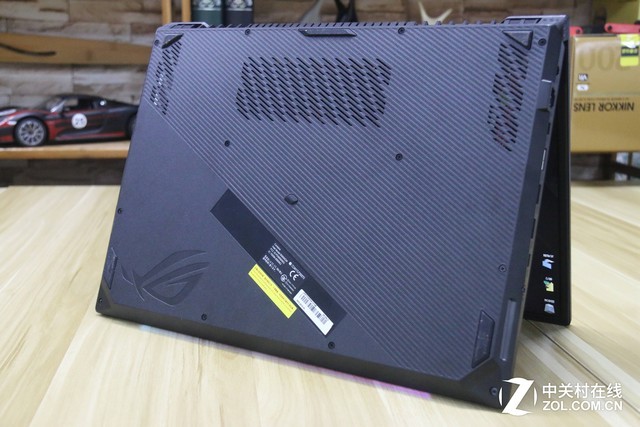
D-side
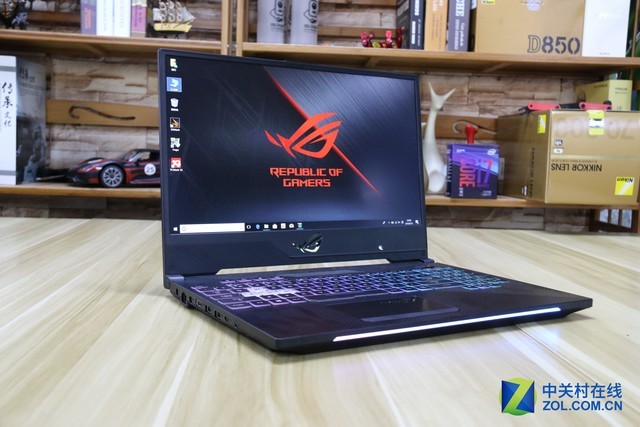
Overall view of ROG Gunslinger 2 after booting
After talking about the appearance features and interface configuration, let’s take a look at the basic configuration of the ROG Gunslinger 2 notebook.
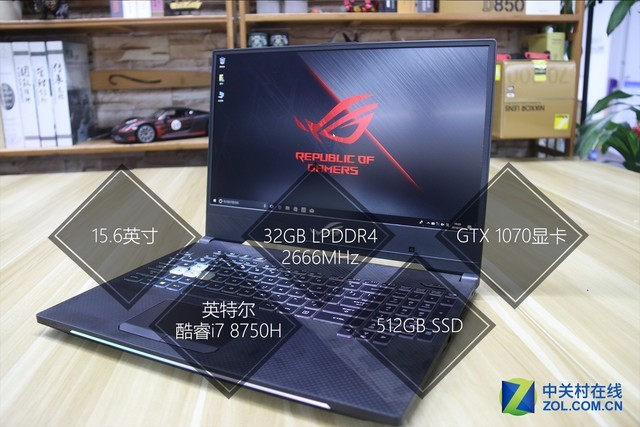
Basic configuration
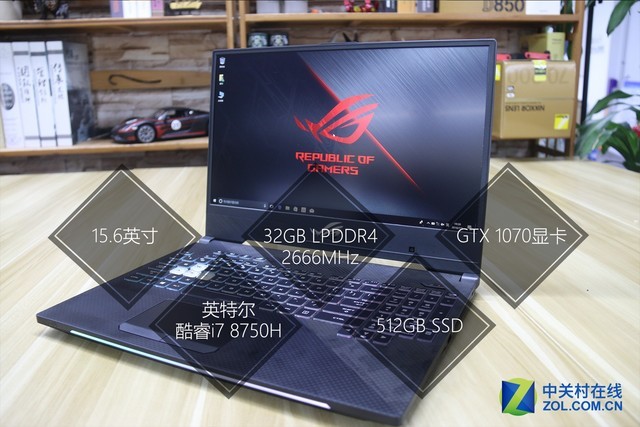
Since we got a media review machine this time, the retail version should be slightly changed. It is not difficult to see that the configuration of ROG Gunslinger 2 is still very luxurious, first of all, it is equipped with Intel eighth-generation i7-8750H six-core twelve-thread processor, which is very powerful, and secondly, there is 32GB DDR4 2666MHz memory (16×2), 512GB SAMSUNG PM981 SSD. And the most surprising thing is that such a thin and light body is stuffed with a GTX 1070 graphics card, which makes me can’t wait to know its heat dissipation capabilities.
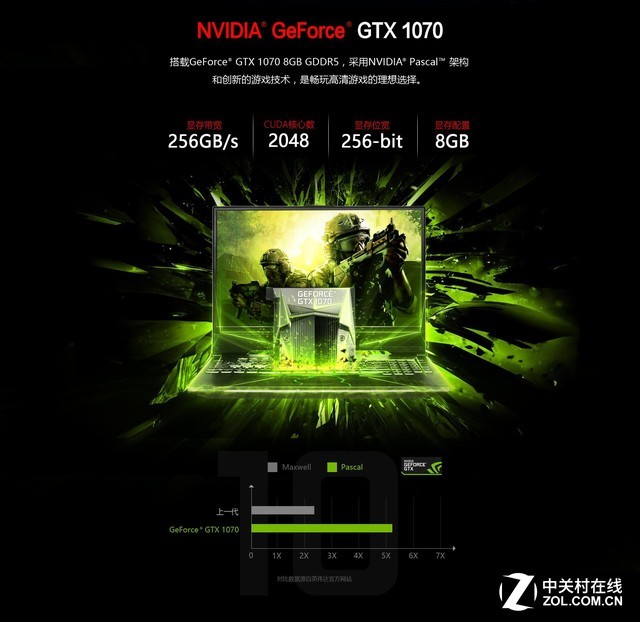
NVIDIA GTX 1070
But before testing its heat dissipation ability, we are still old-fashioned, run a few major software, and see how the benchmark test of this notebook is, first of all, CINEBENCH R15, the results are as shown in the picture, single-core 166cb, multi-core 1245cb, which is on the upper level for the i7-8750H, it seems that the physique is good.
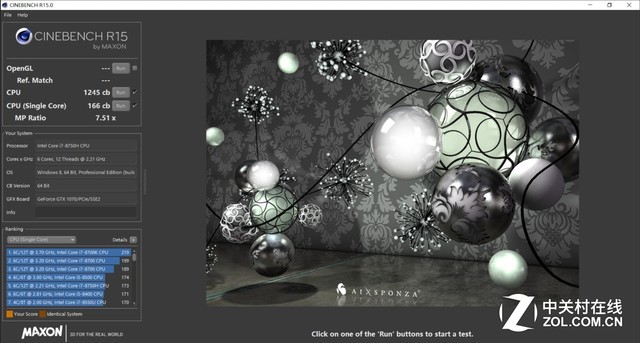
CINEBENCH R15 benchmark scores
As for the SSD, the product we got is equipped with a 512GB SAMSUNG PM981 SSD, with a measured read speed of 2774MB/s and a write speed of 1864MB/s, and the performance is still very strong.
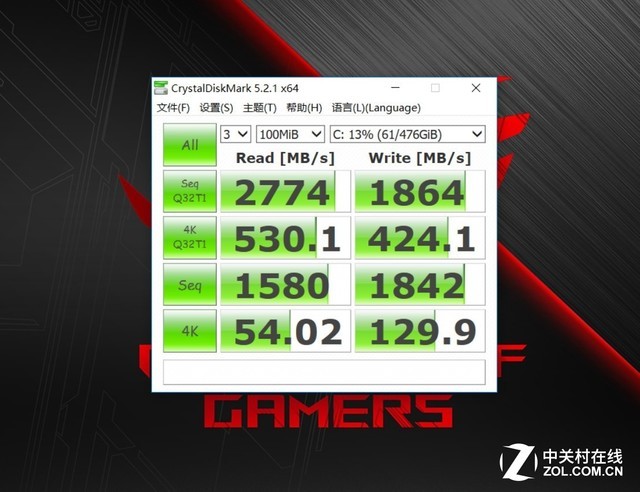
Hard drive performance test
This ROG Gunslinger 2 notebook is equipped with a 15.6-inch 1080P, 144Hz refresh rate, 3ms response time IPS screen, the author used Spyder to measure the color gamut up to 98% sRGB, 70% NTSC, as a gaming screen for a physique is quite good, the color temperature deviation is not large.
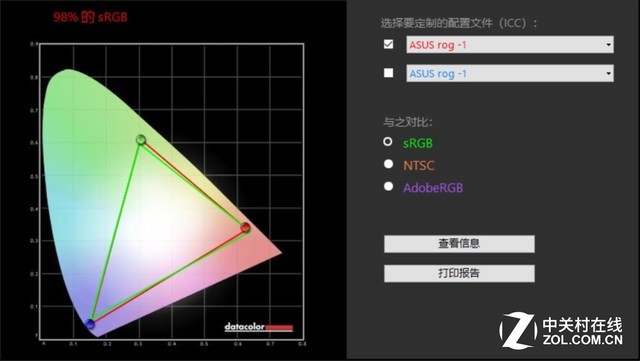
Screen quality
In terms of graphics quality, the author chose TimeSpy and FSE in 3DMark, and the measured scores were 5557 and 7588 points respectively, which was excellent, but I will still show the game performance further through the game.

Time Spy benchmarks
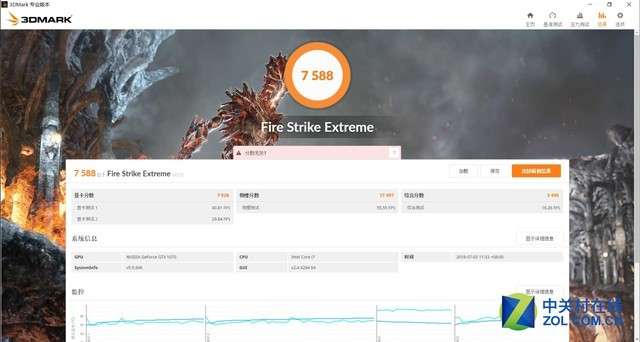
FSE benchmarks
After talking about the appearance features and interface configuration, let’s take a look at the basic configuration of the ROG Gunslinger 2 notebook.
FSE benchmarks
ROG Gunslinger 2 S5CS8750 (16GB/256GB+1TB )
| Basic parameters | Listed in June 2018 |
|---|---|
| Product type: household products | Positioning gaming laptops, audio-visual entertainment notebook operating system pre-installed Windows 10 Home (Home Edition) |
| Motherboard chipset | Intel HM370 |
| processor | CPU seriesIntel Core i7 8th generation series |
| CPU model | Intel Core i7 8750HCPU clocked at 2.2GHz, with a maximum turbo frequency of 4.1GHz, cores/threads, six-core/twelve-thread, L3 cache, 9MB bus specifications, DMI 8 GT/s core architecture, Coffee Lake process process, 14nm, power consumption, and 45W |
| storage devices | Memory Capacity16GB Memory TypeDDR4 2666MHzNumber of Slots2xSO-DIMM Maximum Memory Capacity32GB Hard Disk Capacity256GB+1TB Hard Drive DescriptionHybrid Hard Drive (SSD+HDD) Optical Drive TypeNo Built-in Optical Drive |
| Display | The touch screen does not support touch screen size, 15.6 inches, display ratio, 16:9 screen resolution, 1920×1080 screen technology, FHD, LED backlight, 144Hz gaming screen, 72% NTSC |
| Graphics card | Graphics card type: Enthusiast-grade discrete graphics card, graphics card chip, NVIDIA Geforce GTX 1070 video memory capacity: 8GB video memory type, GDDR5 video memory bit width: 256 bits |
| Multimedia equipment | Camera: HD camera, audio system, built-in sound chip, speakers, 2×3.5W stereo microphone, array microphone |
| Network communication | The wireless network card supports 802.11ac wireless protocol, Bluetooth support, Bluetooth 5.0 module |
| I/O interface | Data Interface 3× USB3.1, USB3.1 Type-C Interface, Video Interface, HDMI, Mini DisplayPort Audio Interface, Headphone Output Interface, Microphone Input Interface, Other Interfaces, RJ45 (Network Interface), Power Interface, Card Reader, SD Card Reader |
| Enter the device | Refers to the device’s touchpad keyboard description full-size RGB backlit keyboard |
| Power Supply Description: | Battery Type: 4-cell lithium battery life depends on the specific usage environment: Power adapter: 100V-240V 180W adaptive AC power adapter |
| Appearance | Notebook weight: 2.4Kg, length 361mm, width: 262mm, thickness: 26.1mm, shell material, composite material, shell description, gun gray |
| Other | Safety Features Kensington Safety Keyhole Included Software Additional Features VR Technology |
| Notebook attachment | Packing List Notebook Host x1 Cooling Base x1 Power Adapter x1 Power Cable x1 Instruction Manual x1 Warranty Card x1 Computer Bag x1 (Subject to Shipment) Trolley Case x1 (Subject to Shipment) Gaming Mouse x1 (Subject to Shipment) |
| Warranty information | Warranty PolicyGlobal Joint WarrantyWarranty Time2 Years Warranty Remarks2 Years Global Joint Warranty, 1 Year Battery Warranty (Product Registration Required)Customer Service Hotline400-600-6655 Telephone Remarks24-hour Telephone Service DetailsASUS laptops can enjoy free after-sales maintenance services within 2 years from the date of purchase, and the hardware failure of the host under normal operation and use conditions. The matching battery provides free warranty service within 6 months from the date of purchase (complete the registration action within 1 month of purchase, and the warranty period is extended to 12 months). When the user provides a formal invoice for the purchase of the aircraft, it will be calculated from the date of issuance of the invoice. If the user cannot provide the official invoice, the product warranty period will be calculated based on the factory date corresponding to the notebook serial number. |